
Knowing the number of sentences can be important when you are writing a blog post, email, or post on social media like Twitter, now known as X. You can only write 280 characters for a post on this social platform. For this, you may need a Twitter character counter.
Sentence Counter
Paste or type text in the box below to count sentences
If you face any issue while using this tool, please report here.
About Sentence Counter
This sentence counter is a fast, accurate, and free online tool that tells you exactly how many sentences your text contains. It’s perfect for students, writers, bloggers, and professionals who want clear, structured writing without any guesswork. Simply paste your content, click “Count,” and get instant results. Alongside this, you can also explore our powerful word counter and character counter tools to analyze the length and depth of your writing comprehensively. There’s no signup or fee required, and your text is 100% secure, making these tools an essential part of any writer’s toolkit for achieving professional, readable content effortlessly.
What is Sentence Counter?
A sentence counter is a digital tool, often found online or within word processing software, that automatically determines the number of sentences within a text. It assists writers by providing valuable insight into sentence structure, helping to ensure clarity and conciseness, while also allowing them to track paragraphs and estimate reading time. This makes it easier to meet specific length requirements for online content, academic papers, or other written work with precision and professionalism.
Note that this tool is online.
Why use a sentence counter?
Writers, students, and content creators need a sentence counter for various reasons, such as:
- Teachers often ask for a specific number of sentences in essays or assignments. A sentence counter can be helpful for academic writing.
- Short and clear sentences are important for ranking on Google. That’s why a sentence counter tool can be important for SEOs and freelance bloggers.
- Editing and proofreading can help you balance your writing so that it’s interesting and easy for readers. Use our run-on sentence checker to ensure your sentences are clear and well structured.
- Keep professional emails and reports short and effective. You can get the help of this tool for this absolutely free.
How to Use the Sentence Counter
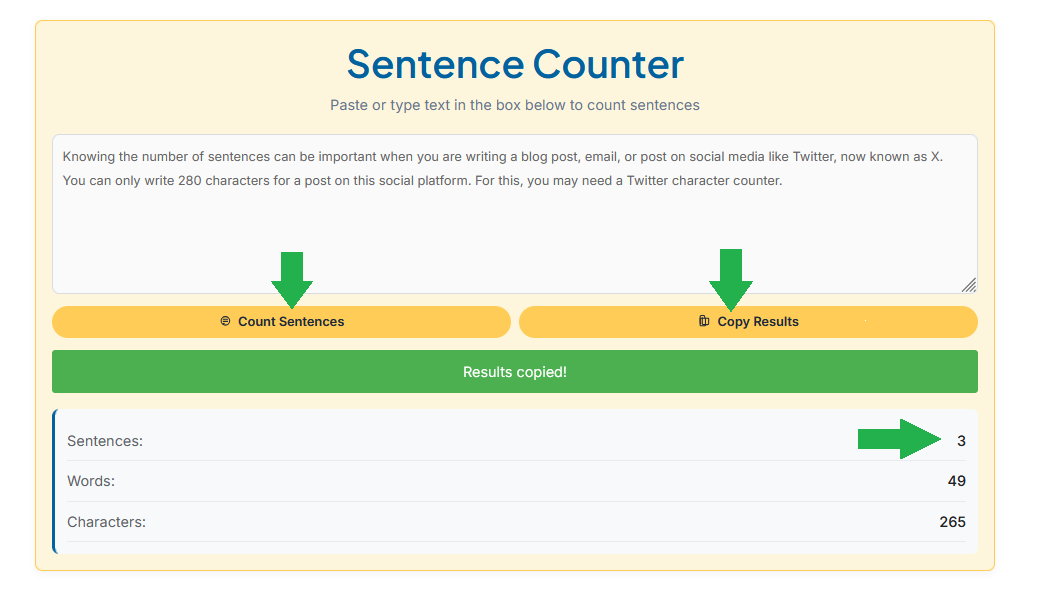
This tool is very easy to use, just follow the steps below:
- Paste or type your text in the sentence counter box.
- Click the “Count Sentences” button.
- Instantly see the total sentence count.
- Now you can copy it or just guess if you want.
Tip: Whenever you finish writing an essay, blog post, or report, use the Sentence Counter tool before submitting or publishing it. This will help you check that your writing is not too long or too short, and that your content is readable and meets the requirements.